Online booking software for barbershops
tilkbook gives barbershops a 24/7 booking page where clients pick their barber, service, and time. No-show protection, per-barber availability, and automatic reminders included.
Why does online booking for barbershops need to be different?
Booksy charges monthly fees on top of per-booking fees
Booksy dominates the barbershop market — but it charges a monthly subscription plus a cut of every booking. On a $35 men's cut, those fees eat real margin. tilkbook's core scheduling is free with no per-booking charge.
Regulars want to guarantee their barber, not just the next open slot
Walk-in flow works for short services, but clients who have had the same barber for three years do not want to risk getting someone else. Per-barber booking lets regulars lock in their person.
Chair rental schedules change week to week
Booth renters set their own hours, take days off on short notice, and rotate in and out of the shop. The booking system has to reflect each barber's real availability, not a fixed shop-wide schedule.
No-shows on longer beard and haircut combos leave a chair empty
A men's cut plus beard trim or straight razor shave can run 45-60 minutes. A no-show on that slot hurts more than a missed 20-minute buzz cut. Deposits protect that chair time.
Sharing a booking link is harder than it sounds without the right tools
Barbers share booking links via Instagram, phone contacts, and NFC tap cards. Without per-barber links and digital business cards, clients land on the shop page and have to find their barber manually.
What features matter for barbershops?
Per-barber calendars and service menus
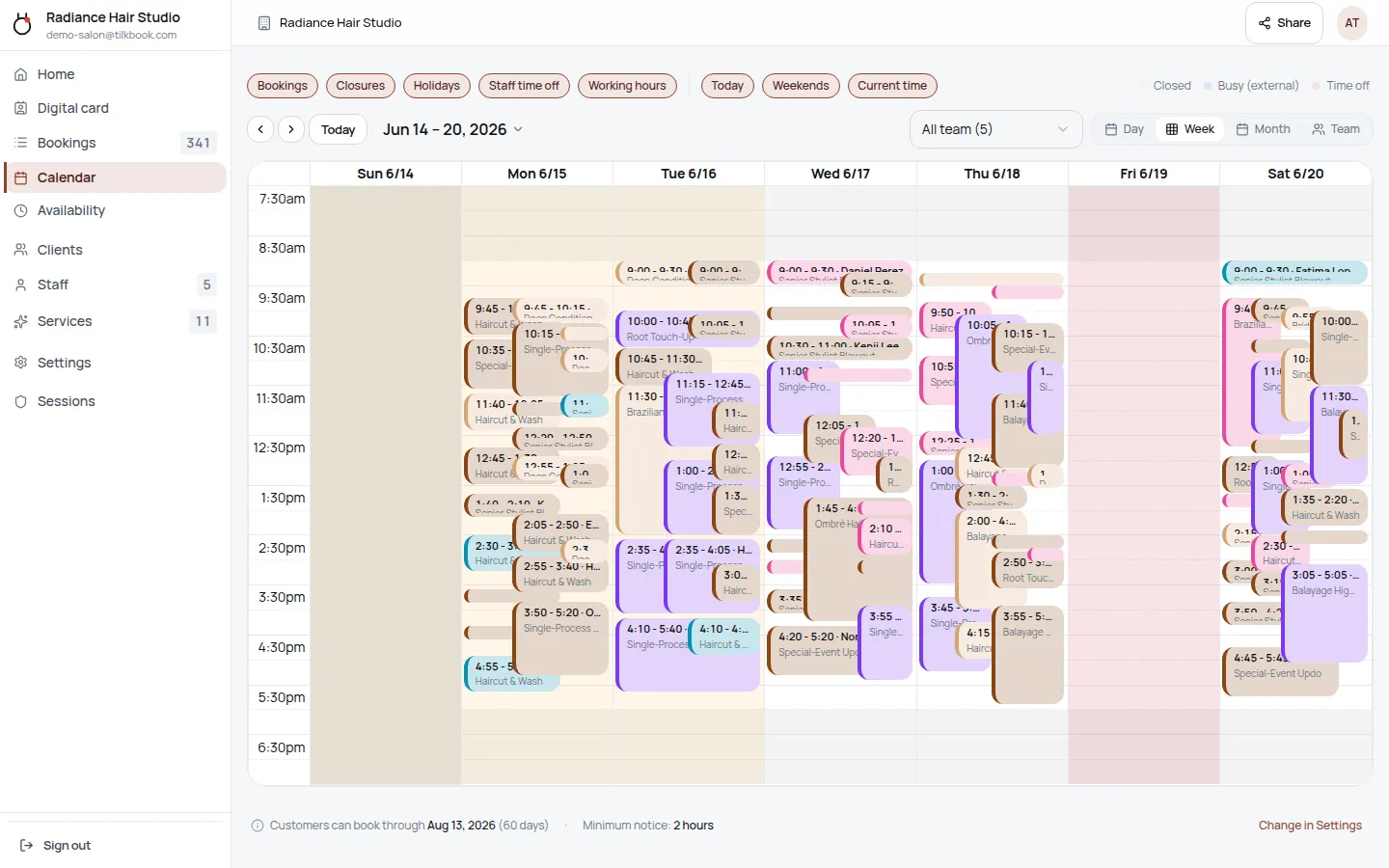
Each barber sets their own schedule, services, and prices. A barber who does skin fades and straight razor shaves sets those up independently from a barber who only does tapers and buzz cuts. Clients pick their barber first, then book the right service.
Email reminders (free) and SMS reminders (paid upgrade)
Every booking sends an immediate confirmation email. Automated email reminders go out on every plan at no cost. SMS text reminders — with open rates around 98% — are available as a paid upgrade for shops that want maximum show rates.
Deposits and no-show fees
Charge a deposit on longer appointments — beard trims, straight razor shaves, combo cuts. If the client no-shows, the fee charges automatically via the optional Stripe payments add-on. Cancellation windows are configurable per service.
Per-barber digital business cards with NFC tap
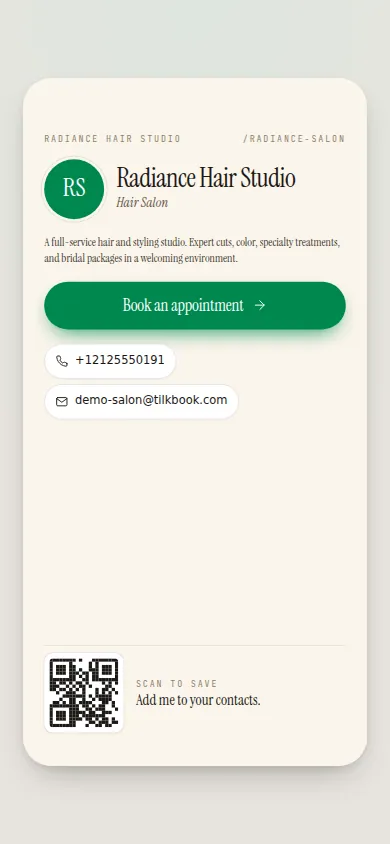
Every barber gets a personal digital business card. Share it as a short link on Instagram, tap-to-share via NFC between phones, or print a QR code on a physical card. Each card links directly to that barber's booking page — not the generic shop page.
Waitlist when a barber is fully booked
When a client books a popular barber and their slots fill up, others can join the waitlist. When a cancellation opens a gap, tilkbook auto-notifies the next person in line with a claim link — no manual outreach needed.
Google Calendar sync for every barber
Each barber can connect their personal Google Calendar or any iCal feed. tilkbook reads their busy blocks and writes new bookings back automatically, so the barber's external calendar always reflects their real schedule.
Bulk-reschedule for closures and staff changes
When a barber leaves or the shop closes for a holiday, bulk-reschedule moves all affected bookings at once — with substitute-staff suggestions and a preview before committing. No manual rebooking one appointment at a time.
tilkbook is free online booking software for barbershops. Clients open the shop’s booking page, pick their barber — skin fade specialist, straight razor shave expert, or the barber who has done their taper for years — choose a service, and lock in a slot without calling or walking in to check availability. Each barber’s schedule, services, and prices live independently. A skin fade takes the same slot as an edge-up; a men’s cut plus beard trim runs longer; a lineup or buzz cut is faster. The booking engine calculates availability correctly for each combination. Automated email reminders go out before every appointment on every plan, free. SMS reminders — with 98% open rates — are a paid upgrade. Deposits and no-show fees require the optional Stripe payments add-on. The whole setup — services, barbers, hours — takes under 10 minutes. Unlike Booksy, which charges monthly subscription fees and per-booking fees in a market where $35 cuts leave thin margins, tilkbook’s core scheduling is free.
How does per-barber booking work for a barbershop?
Each barber on tilkbook has their own profile, their own service menu, and their own availability calendar. The shop owner builds the master service list — fade, taper, skin fade, low taper, high taper, lineup, edge-up, beard trim, straight razor shave, men’s cut, bald fade, buzz cut — and assigns the relevant services to each barber.
A barber who specialises in skin fades and straight razor shaves lists those. A barber who focuses on tapers and men’s cuts lists those. When a client opens the booking page, they pick their barber first and then only see the services that person actually offers, at that person’s prices.
For booth renters, this matters especially. A barber renting a chair sets their own schedule — Tuesday through Saturday, 9am to 6pm — independently from the shop’s general hours or another renter’s schedule. When they take a day off or change their hours, they update their own profile. Clients who book that barber see the correct availability without the owner having to manage it manually.
Per-barber digital business cards extend the booking flow outside the shop. Each barber gets a card with a short link and NFC tap support. A client saves the barber’s card to their phone contacts after the first cut. Next time they need a haircut, they tap or click the link and book directly. No searching, no calling, no walking in to check.
Can I charge a deposit on longer appointments?
Yes. Deposits are available on any service through the optional Stripe-powered payments add-on. For barbershops, the most common use case is longer combo appointments — a men’s cut plus beard trim, or a men’s cut plus a straight razor shave — where a no-show leaves a 45-60 minute gap in the chair that cannot be filled on short notice.
Deposits are configured per service. A shop might require a deposit on any appointment over 30 minutes and skip it for a quick fade or buzz cut. The deposit amount is flexible. When a client books, they enter a card at checkout; the deposit captures immediately and the remaining balance settles in-shop.
If the client cancels outside the cancellation window, the deposit refunds. If they cancel inside the window or no-show, the shop retains the deposit as a cancellation fee, or an additional no-show fee can be charged off-session. The shop owner can also excuse a no-show for a regular client — reverses the charge, logs the excuse, keeps the relationship intact.
For shops not yet on the payments add-on, the booking flow defaults to pay-in-shop. The booking still works; money just does not move online until the add-on is connected.
How do automated reminders reduce no-shows for barbershops?
Every booking generates a confirmation email immediately. Automated email reminders go out before the appointment on every plan — no configuration required, no extra cost.
For higher-value appointments or shops with a persistent no-show problem, SMS text reminders are available as a paid upgrade. Text messages are harder to miss than email — open rates run around 98% — and a reminder the morning of a cut significantly improves show rates. SMS compliance (TCPA opt-out) is handled automatically; clients who reply STOP are removed from SMS reminders.
Reminder timing is configurable. A common setup: an email 24 hours before, and an SMS the morning of the appointment. Staff also receive notifications for new bookings, cancellations, and reschedules. Notification settings are in the admin dashboard under Settings → Notifications.
When a client cancels, tilkbook checks the waitlist. If another client is waiting for that barber at a matching time, they receive a claim link to take the slot — filling the gap without any manual outreach from the shop.
What does tilkbook cost compared to Booksy for barbershops?
Booksy is the most widely used booking platform in the barbershop market. It has a large network of users who discover barbers through the Booksy app, which is a real distribution benefit. The cost trade-off is real: Booksy charges a monthly subscription plus per-booking fees. On a $35 men’s cut volume, those fees add up.
tilkbook’s core scheduling — per-barber calendars, unlimited bookings, email reminders, waitlist, digital business cards, Google Calendar sync — is free. No monthly subscription, no per-booking fee. SMS reminders and the Stripe payments add-on (deposits, no-show fees) are the paid upgrades.
For a barbershop that already has its own client base and does not need the Booksy discovery network, tilkbook reduces software overhead to zero on the core booking workflow. Barbers who share their personal booking link via Instagram or NFC business cards build their own direct-booking channel rather than depending on platform discovery.
See the full feature and pricing comparison or learn more about the Stripe payments integration.
How does a barbershop go live on tilkbook?
Setup is a guided checklist after signup:
- Add services — name each service (fade, taper, lineup, beard trim, straight razor shave, etc.), set the duration and price. Use the barbershop vertical template to pre-populate a starter list, then edit to match the shop’s actual menu.
- Invite barbers — add each barber by email. They accept the invite, set their own hours and days, and assign their services. Booth renters manage their own calendars independently.
- Set shop hours — the availability engine uses shop hours plus each barber’s individual schedule to generate bookable slots.
- Share the booking link — paste it in the shop’s Instagram bio, Google Business Profile, or on a printed QR card at the counter.
The shop goes live as soon as there is at least one active service, business hours set, and at least one active barber. No credit card required.
What features are free for barbershops on tilkbook?
Everything in the core booking workflow is free — no subscription, no per-booking charge:
- Unlimited bookings received
- Per-barber service menus, calendars, and availability
- Booking confirmations and email reminders
- Waitlist with automatic slot offers on cancellations
- Customer management and booking history
- Digital business cards — one for the shop and one for each barber, with NFC tap and Apple/Google Wallet
- Google Calendar sync (two-way) and iCal feed import
- Bulk-reschedule for closures and barber changes
Paid upgrades:
- SMS reminders (paid add-on)
- Deposits, no-show fees, tips, refunds, and discount codes (optional payments add-on via Stripe — see Stripe integration)
For most barbershops, the free tier covers the complete booking workflow. SMS and payments are there when the shop needs them.
tilkbook is a free Booksy alternative for barbershops that want per-barber scheduling, deposits, and no-show protection without a monthly software bill. It also works well for shops that used Setmore, Fresha, Acuity Scheduling, or Calendly and want a platform purpose-built for service businesses with multiple staff. See how tilkbook handles pricing versus competitors.
Questions barbershops ask first.
How does tilkbook compare to Booksy for barbershops?
Booksy is the dominant booking platform in the barbershop market and has strong network effects. The core difference is cost: Booksy charges a monthly subscription plus per-booking fees. tilkbook's core scheduling is free — no monthly fee and no cut of each booking. Both support per-barber calendars, deposits, and reminders. tilkbook adds per-barber digital business cards with NFC support, which Booksy does not offer natively.
Can booth renters each have their own independent booking page?
Yes. Each barber on tilkbook has their own service menu, availability, and booking page. A booth renter who works Tuesday through Saturday sets their own hours independently. Clients book that specific barber directly. The shop owner manages the roster but each barber controls their own schedule and services.
Can I mix walk-ins and online bookings?
tilkbook handles the appointment side — online bookings 24/7. Walk-ins are handled at the chair as always; tilkbook does not have a digital walk-in queue. For shops that want to move regulars online while keeping walk-ins for shorter services, the per-barber booking page gives regulars a direct link to guarantee their person without disrupting the walk-in flow.
Is the booking software really free?
The core product — unlimited bookings, per-barber calendars, email reminders, waitlist, and digital business cards — is free with no per-booking fees and no monthly subscription. SMS reminders are a paid upgrade. Deposits, no-show fees, and online payments require the optional Stripe-powered payments add-on.
How long does setup take for a barbershop?
Most barbershops are live in under 10 minutes: add services (fade, taper, lineup, beard trim, straight razor shave), invite barbers by email, set business hours, and share the booking link. Each barber completes their own profile independently after accepting the invite.
Try it in your chair.
Set up a real booking page for barbershops in under 18 minutes. Free to start — no card.